 FreeKm


MeTube 安装教程:VPS 装好就能下视频
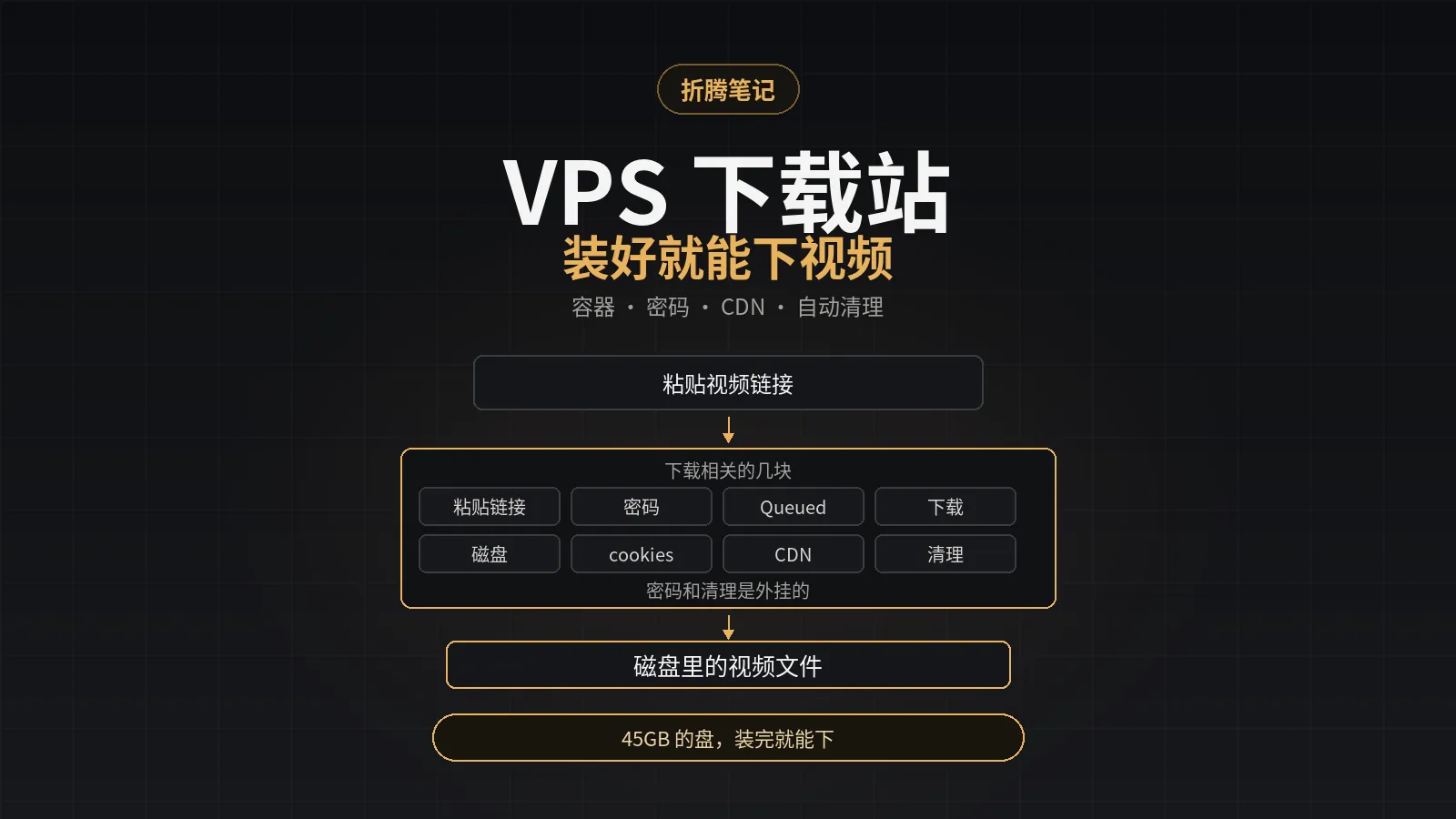
45GB 的盘,装完 MeTube 只下几部剧就满;更麻烦的是,默认安装没有密码,谁拿到 IP 都能用。下面从 SSH 登录开始,在一台 2 核 2G 的 Linux VPS 上(我用 Ubuntu 24.04 验证)装 Docker、起 MeTube、加 Nginx 密码、绑 Cloudflare 域名,最后装自动清理。
装完你能用 https://yttest.freekm.com 打开 MeTube,浏览器先要用户名密码,粘贴视频链接就能下载。原理、Cloudflare 模式和实测数据放在文末折叠,不影响照着做。
- MeTube 只监听 127.0.0.1<8081>,外面统一走 Nginx 的 Basic Auth
- Cloudflare 用 Flexible,回源 80;443/Full 的说明在附录
- 每 4 小时删一个最旧视频,磁盘 85% 起批量删;不要当媒体库
给 Agent 的提示词
如果你把这篇交给 agent 执行,先把下面这段提示词和环境信息发给它;人类读者可以跳过这一节,直接看「装好之后是什么样」。
你在一台 Linux VPS 上按这篇文章安装 MeTube(我用 Ubuntu 24.04 验证):<链接或粘贴文章>
环境:VPS IP:...SSH 端口:22域名:...用户名:metube密码:...
要求:1. 先预检发行版、包管理器、磁盘和 80/443/8081 端口。2. 严格按文章步骤;所有交互命令改非交互(htpasswd 用 -cb),不要用编辑器。3. Cloudflare DNS 和 SSL 没 API token 就停下来问我,不要猜。4. 每步跑验收,失败就停止并贴报错。5. cookies 如果要用,按文章的文件方式放,不要打印内容。6. 不要动已有的 Nginx 站点;不要把密码、cookies 写进日志或回复。环境信息直接写成文字,agent 自己能对应;不用定义 shell 变量。把上面的 ... 和示例域名换成你的实际值。
装好之后是什么样
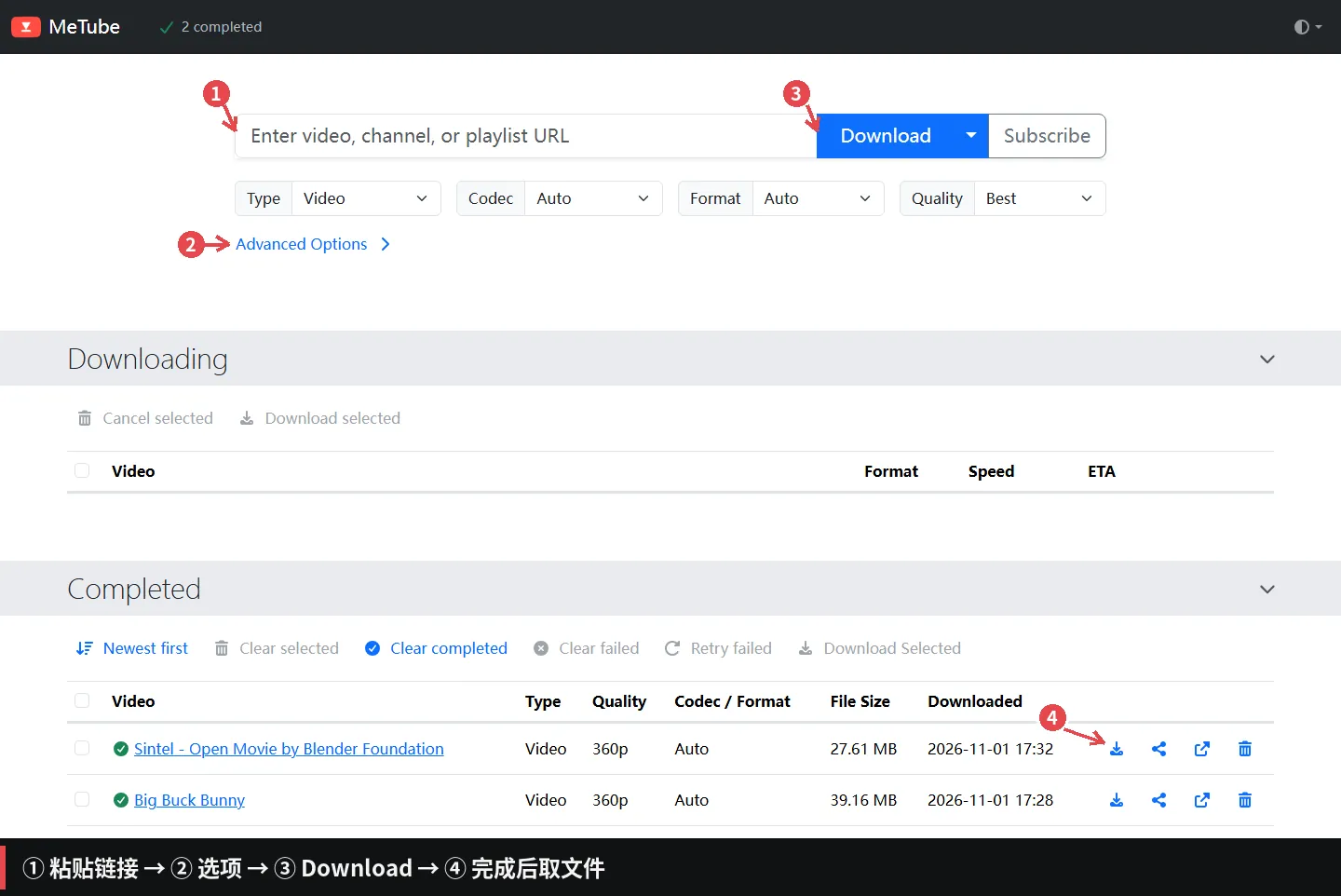
这是最终界面:① 粘贴链接,② 在 Advanced Options 改选项,③ 点 Download,④ 完成后点下载图标。下面开始装。
连接 VPS
用你的 SSH 执行工具连上,别让 ssh 卡在密码提示;连上后从「安装 Docker」开始。
我用 Ubuntu 24.04 验证;下面的安装块会自动判断 apt / dnf / pacman / zypper。Nginx 配置放 conf.d,这几个发行版都会加载;默认 systemd,Alpine 不在覆盖范围。
在 Windows 的 PowerShell 或 macOS 终端里:
ssh root@你的VPS_IP端口不是 22 的话:
ssh -p 2222 root@你的VPS_IP首次连接输入 yes,再输密码。看到 root@...:~# 就对了。
先更新软件索引:
if command -v apt-get >/dev/null; then apt-get updateelif command -v dnf >/dev/null; then dnf makecacheelif command -v pacman >/dev/null; then pacman -Syu --noconfirmelif command -v zypper >/dev/null; then zypper refreshfi安装 Docker
curl -fsSL https://get.docker.com -o /tmp/get-docker.shsh /tmp/get-docker.shdocker --versiondocker compose version看到两个版本号就继续;我装的是 Docker 29.9.2、Compose v5.6.1。这台机器用了 43 秒。
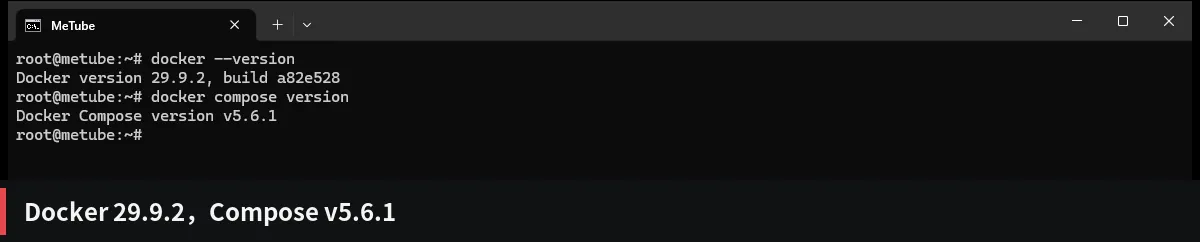
如果 docker compose version 报找不到命令,按发行版补:
Debian/Ubuntu: apt-get install docker-compose-pluginRHEL/Fedora: dnf install docker-compose-pluginArch: pacman -S docker-compose,后面把 docker compose 换成 docker-composeArch 也没装 Docker 的话:
pacman -S docker docker-composesystemctl enable --now dockeropenSUSE 同理:
zypper install docker docker-composesystemctl enable --now dockerArch / openSUSE 后面把 docker compose 换成 docker-compose。其他发行版直接用上面的 get.docker.com 脚本。
创建 MeTube 配置
mkdir -p /opt/metube/downloads/.metube直接执行下面整段,创建 /opt/metube/compose.yaml:
cat > /opt/metube/compose.yaml <<'EOF'services: metube: image: ghcr.io/alexta69/metube:latest container_name: metube restart: unless-stopped ports: - "127.0.0.1:8081:8081" volumes: - ./downloads:/downloads environment: - PUID=1000 - PGID=1000 - UMASK=022 - MAX_CONCURRENT_DOWNLOADS=2 - DELETE_FILE_ON_TRASHCAN=true - DEFAULT_THEME=autoEOF127.0.0.1 不要改成 0.0.0.0,否则就绕过后面的密码了。下载的文件会落在 /opt/metube/downloads。
启动 MeTube
cd /opt/metubedocker compose up -ddocker compose pscurl -s -o /dev/null -w '%{http_code}\n' http://127.0.0.1:8081/第一次会拉 1GB 左右的镜像。看到 healthy 和 200 就成功。

如果 curl 返回 000,看日志:
docker compose logs --tail=50加密码
if command -v apt-get >/dev/null; then apt-get install -y nginx apache2-utilselif command -v dnf >/dev/null; then dnf install -y nginx httpd-tools setsebool -P httpd_can_network_connect 1 || trueelif command -v pacman >/dev/null; then pacman -S --noconfirm nginx apache-toolselif command -v zypper >/dev/null; then zypper install -y nginx apache2-utilsfihtpasswd -cb /etc/nginx/.htpasswd metube '你的密码'把 '你的密码' 换成实际密码。密码会进 shell 历史;不想留痕就用交互式:
htpasswd -c /etc/nginx/.htpasswd metube按提示输两遍。agent 直接用 -cb。
htpasswd 默认生成 644,Nginx 能读;想收紧就改成 Nginx 用户组(Debian/Ubuntu www-data,RHEL nginx,Arch http)再 chmod 640。
把配置里的 yttest.freekm.com 换成你的域名,然后整段执行:
cat > /etc/nginx/conf.d/metube.conf <<'EOF'server { listen 80; server_name yttest.freekm.com;
auth_basic "MeTube"; auth_basic_user_file /etc/nginx/.htpasswd;
add_header Cache-Control "no-store" always;
location / { proxy_pass http://127.0.0.1:8081; proxy_http_version 1.1;
proxy_set_header Host $http_host; proxy_set_header X-Real-IP $remote_addr; proxy_set_header X-Forwarded-For $proxy_add_x_forwarded_for; proxy_set_header X-Forwarded-Proto $http_x_forwarded_proto; proxy_set_header Upgrade $http_upgrade; proxy_set_header Connection "upgrade"; proxy_set_header Authorization "";
proxy_buffering off; proxy_request_buffering off; proxy_read_timeout 3600s; }}EOF不想在粘贴前改域名,也可以原样执行后替换:
sed -i 's|yttest.freekm.com|你的域名|g' /etc/nginx/conf.d/metube.confDebian/Ubuntu、RHEL/Fedora、Arch 的 Nginx 都会 include conf.d/*.conf,不用建软链,也不用删默认站。
启用并测试:
nginx -tsystemctl enable --now nginxsystemctl restart nginxcurl -sI http://127.0.0.1 -H 'Host: yttest.freekm.com' | head -1curl -sI -u metube:你的密码 http://127.0.0.1 -H 'Host: yttest.freekm.com' | head -1预期是 HTTP/1.1 401 和 HTTP/1.1 200。
如果 htpasswd -B 生成 bcrypt 后 Nginx 一直 401,/var/log/nginx/error.log 里写 password mismatch,换成默认的 apr1(去掉 -B)重新生成。我在 Ubuntu 24.04 的 Nginx 1.24 上遇到过。
绑定域名
域名已经解析到 Cloudflare 的话,跳过 DNS 那几步,只确认 SSL/TLS 模式。
DNS 和 SSL 这两步要么在 CF 后台点,要么用 API;没 token 就问人,不要猜着改。
- 打开 Cloudflare 的 DNS → 记录 → 添加记录
- 类型选 A,名称填
yttest,IPv4 填 VPS 的 IP - 代理状态打开(橙色云),保存
- 打开 SSL/TLS → 概述,加密模式选 Flexible
如果这个 Cloudflare 账号下还有主站,改 Flexible 前先确认不会影响它。
等一分钟,访问 https://yttest.freekm.com,应该先弹登录框。
curl -sI https://yttest.freekm.com | head -1curl -sI -u metube:你的密码 https://yttest.freekm.com | head -1预期是 HTTP/2 401 和 HTTP/2 200。
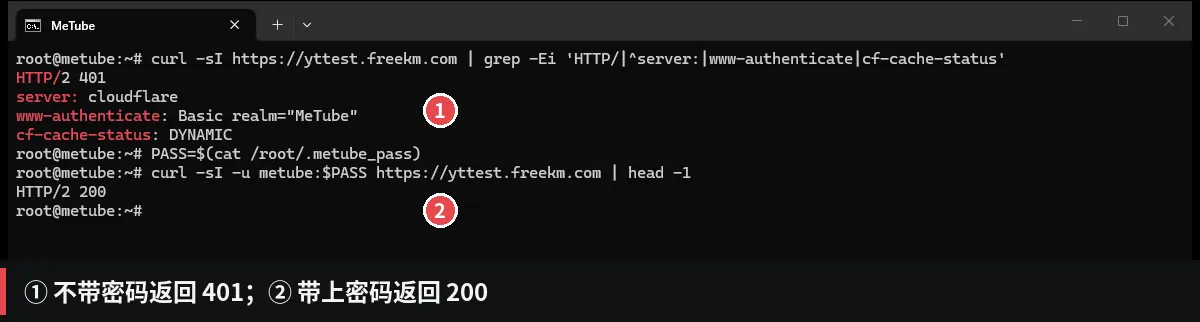
地址栏里是 https://yttest.freekm.com,响应头里是 server: cloudflare。
如果返回 521,说明 Cloudflare 连不上源站:
systemctl status nginxss -tlnp | grep :80上传 cookies
公开视频不用传。遇到「Sign in to confirm you’re not a bot」、私有视频或年龄限制时,按下面两步做:先从 YouTube 导出 cookies,再上传到 MeTube。
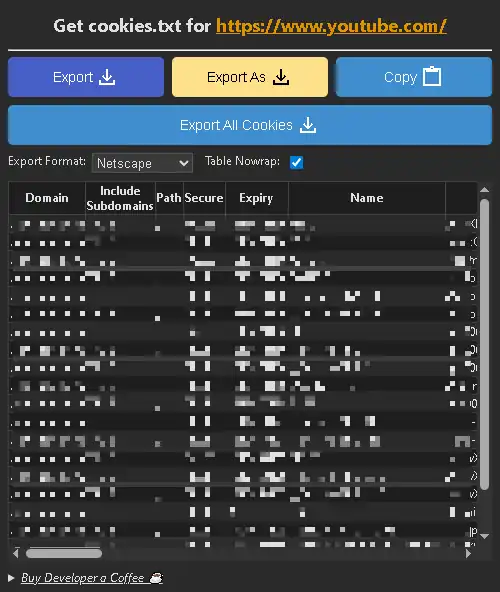
从 YouTube 导出 cookies
- 在 Chrome 商店安装 Get cookies.txt LOCALLY。
- 打开
chrome://extensions,点这个扩展的「详情」,打开「在无痕模式下允许」。 - 按
Ctrl+Shift+N(macOS 是Cmd+Shift+N)开无痕窗口,打开 YouTube 并登录。 - 点扩展图标,确认顶部域名是
https://www.youtube.com/,点 Export All Cookies。 - 浏览器通常会下载
www.youtube.com_cookies.txt;文件名不用改,MeTube 上传后会存成cookies.txt。
上传到 MeTube
install -o 1000 -g 1000 -m 600 cookies.txt /opt/metube/downloads/.metube/cookies.txt,再 docker restart metube;不要打印文件内容。
- 打开
https://yttest.freekm.com并登录 - 展开 Advanced Options
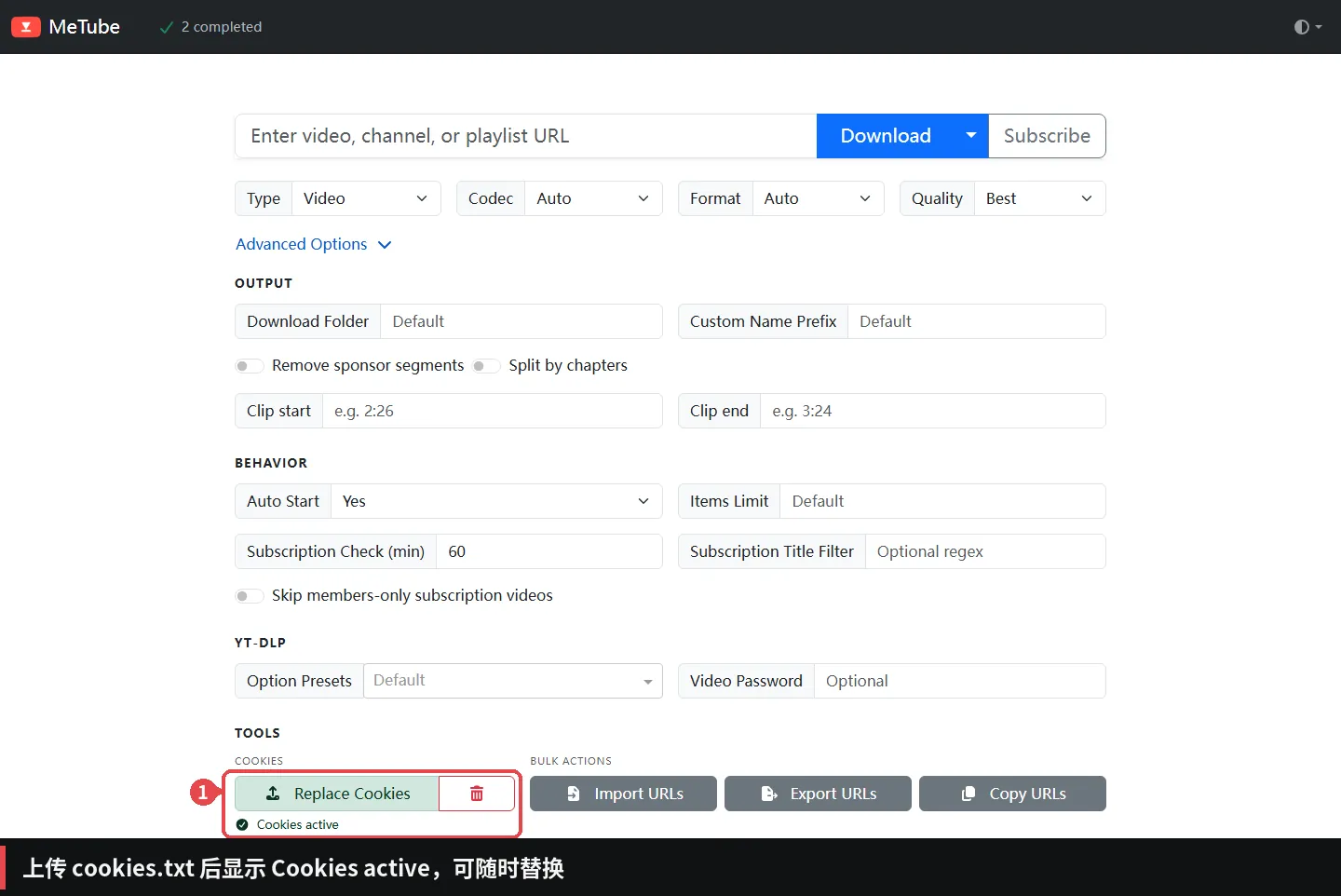
- 找到 COOKIES,点 Upload Cookies 或 Replace Cookies
- 选择刚下载的 cookies 文件
- 状态变成 Cookies active 就成功
别把 cookies.txt 发人、别提交仓库;截图前把值打码。
cookies 会过期。下载突然要求登录,就重新导出一份替换。
下载第一个视频
- 打开
https://yttest.freekm.com,输入用户名和密码 - 把视频链接粘贴到输入框
- Quality 先选 360p,Format 选 MP4
- 点 Download
- 在 Completed 里点下载图标取文件
界面就是开头那张图。
测试可以用 Blender 基金会的两部开放电影,CC BY 3.0,允许商用,署名 Blender Foundation:
如果一直停在 Queued,看实时日志:
cd /opt/metubedocker compose logs -f metube自动清理
这一步可选,盘小建议装。先装 cron:
if command -v apt-get >/dev/null; then apt-get install -y cronelif command -v dnf >/dev/null; then dnf install -y cronieelif command -v pacman >/dev/null; then pacman -S --noconfirm cronieelif command -v zypper >/dev/null; then zypper install -y cronfi再执行下面整段,创建 /opt/metube/cleanup.sh:
cat > /opt/metube/cleanup.sh <<'EOF'#!/usr/bin/env bash# MeTube 自动清理:每 4 小时删一个最旧视频;磁盘占用过高时批量删最旧视频。set -euo pipefail
DOWNLOADS_DIR="${DOWNLOADS_DIR:-/opt/metube/downloads}"STATE_DIR="$DOWNLOADS_DIR/.metube"LOG_FILE="${LOG_FILE:-/var/log/metube-cleanup.log}"DISK_THRESHOLD="${DISK_THRESHOLD:-85}"DISK_TARGET="${DISK_TARGET:-75}"MAX_DELETE="${MAX_DELETE:-20}"MODE="${1:-oldest}"DRY_RUN="${DRY_RUN:-0}"
mkdir -p "$(dirname "$LOG_FILE")"exec 9>"/run/metube-cleanup.lock"flock -n 9 || exit 0
log() { printf '%s [%s] %s\n' "$(date '+%F %T')" "$MODE" "$*" >>"$LOG_FILE"}
if [ ! -d "$DOWNLOADS_DIR" ]; then log "downloads directory missing: $DOWNLOADS_DIR" exit 1fi
disk_usage() { df --output=pcent "$DOWNLOADS_DIR" | tail -n 1 | tr -dc '0-9'}
list_oldest() { find "$DOWNLOADS_DIR" -type f -mmin +2 \ ! -path "$STATE_DIR/*" \ ! -name '*.part' ! -name '*.ytdl' ! -name '*.temp' \ \( -iname '*.mp4' -o -iname '*.mkv' -o -iname '*.webm' \ -o -iname '*.mov' -o -iname '*.avi' -o -iname '*.flv' \ -o -iname '*.ts' -o -iname '*.m4v' -o -iname '*.3gp' \ -o -iname '*.mp3' -o -iname '*.m4a' -o -iname '*.opus' \ -o -iname '*.ogg' -o -iname '*.flac' -o -iname '*.wav' \ -o -iname '*.aac' \) \ -printf '%T@ %p\n' 2>/dev/null | sort -n | cut -d' ' -f2-}
delete_video() { local file="$1" base="$1" size base="${file%.*}" size=$(du -h "$file" | cut -f1) if [ "$DRY_RUN" = "1" ]; then log "dry-run: would remove $file ($size)" return 0 fi rm -f -- "$file" log "removed $file ($size)" local ext for ext in info.json description jpg jpeg png webp vtt srt ass lrc; do if [ -f "$base.$ext" ]; then rm -f -- "$base.$ext" fi done find "$DOWNLOADS_DIR" -mindepth 1 -type d -empty ! -path "$STATE_DIR*" -delete 2>/dev/null || true}
case "$MODE" in oldest) file=$(list_oldest | awk 'NR==1') if [ -z "$file" ]; then log "no video files, nothing to do" exit 0 fi delete_video "$file" log "4h cleanup finished" ;; disk) usage=$(disk_usage) log "disk check: ${usage}% used (threshold ${DISK_THRESHOLD}%)" if [ "$usage" -lt "$DISK_THRESHOLD" ]; then exit 0 fi count=0 while [ "$usage" -ge "$DISK_TARGET" ] && [ "$count" -lt "$MAX_DELETE" ]; do file=$(list_oldest | awk 'NR==1') if [ -z "$file" ]; then log "no deletable video left" break fi delete_video "$file" count=$((count + 1)) usage=$(disk_usage) done log "disk cleanup finished: ${usage}% used, removed ${count} file(s)" ;; *) echo "usage: $0 [oldest|disk]" >&2 exit 2 ;;esacEOF然后赋权:
chmod +x /opt/metube/cleanup.sh写 cron:
cat >/etc/cron.d/metube-cleanup <<'EOF'SHELL=/bin/bashPATH=/usr/local/sbin:/usr/local/bin:/usr/sbin:/usr/bin:/sbin:/bin
0 */4 * * * root /opt/metube/cleanup.sh oldest >>/var/log/metube-cleanup-cron.log 2>&1*/5 * * * * root /opt/metube/cleanup.sh disk >>/var/log/metube-cleanup-cron.log 2>&1EOFchmod 644 /etc/cron.d/metube-cleanupsystemctl enable --now cron 2>/dev/null || systemctl enable --now crond 2>/dev/null || systemctl enable --now croniesystemctl restart cron 2>/dev/null || systemctl restart crond 2>/dev/null || systemctl restart cronie过几分钟看日志:
tail -n 5 /var/log/metube-cleanup.log每 5 分钟会出现一条 disk check;每 4 小时会删一个最旧视频。
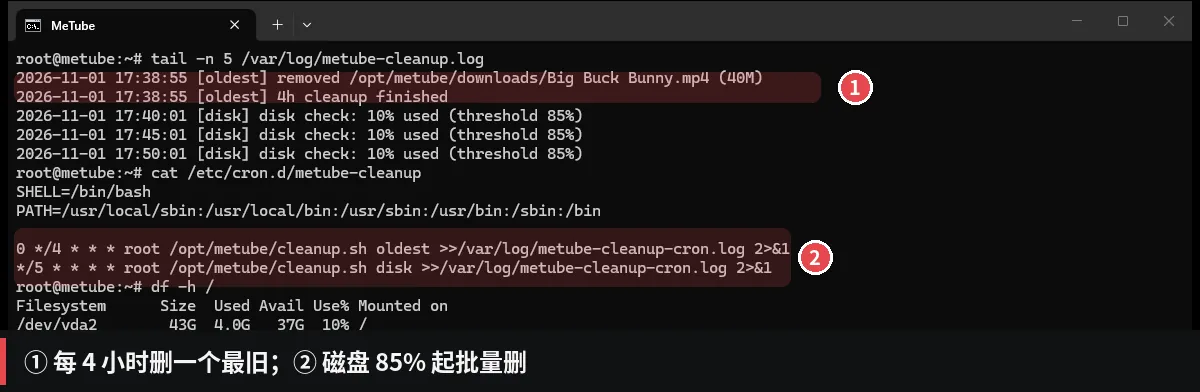
这套策略把下载目录当缓存,不是媒体库。要留片就把 0 */4 那行注释掉(命令在常见问题里),只留磁盘检查;否则每 4 小时少一个视频,直到删空。
常见问题
Q:用户名密码都对,为什么还是 401?
先看 /var/log/nginx/error.log 是不是 password mismatch。是的话,多半是 htpasswd -B 生成的 $2y$ 哈希 Nginx 不认,换成默认 apr1。不是的话,开无痕窗口排除浏览器缓存的旧密码。
Q:Cloudflare 返回 521 / 522?
521 是 CF 连不上源站,522 是连接超时。先 systemctl status nginx,再 ss -tlnp | grep :80。源站没起来,跟证书无关。
如果是 526,说明 CF 是 Full (strict),但不信任源站证书:改用 Flexible,或给源站配 Cloudflare Origin 证书 / Let’s Encrypt。
Q:页面一直显示 Connecting to server?
F12 看 /socket.io/?EIO=4&transport=websocket 是不是 101。不是就检查 Nginx 的 Upgrade / Connection 两行。
Q:下载失败,提示要登录或 bot 检查?
在 Advanced Options 里上传新的 cookies.txt,状态显示 Cookies active 再试。cookies 会过期,别把文件发人。
Q:为什么走了 CF 还是不快?
CF 免费版不保证带宽,这篇也关了缓存,每次回源。你到 CF 节点的线路、时段、文件大小都有影响。要稳定高速,换对象存储 + CDN 或专线。
Q:怎么只保留磁盘满清理,不每 4 小时删?
注释 /etc/cron.d/metube-cleanup 里 0 */4 那一行,然后重启 cron:
sed -i 's|^0 \*/4|# 0 */4|' /etc/cron.d/metube-cleanupsystemctl restart cron 2>/dev/null || systemctl restart crond 2>/dev/null || systemctl restart cronie只留 */5 的 disk 检查。
附录:原理、Cloudflare 和实测
点开看原理、Cloudflare 模式、清理逻辑和实测数据
为什么用 Nginx 反代
MeTube 官方不做登录系统,认证交给反向代理更稳。Nginx 的 auth_basic 只做一件事:没带正确用户名密码的请求,直接返回 401,不会到 MeTube。
容器端口只绑 127.0.0.1:8081,公网只能从 Nginx 进来。这样即使有人扫到 8081,也连不上。
Flexible、Full 和 no-store
Cloudflare 现在是 Flexible:浏览器到 CF 是 HTTPS,CF 到源站是 HTTP。所以 Nginx 只开 80 也能用,但 Basic Auth 的密码在 CF 到 VPS 这一段是明文。个人用可以接受;介意就切 Full(源站加 443 和证书),或者 Full (strict) + Cloudflare Origin 证书 / Let’s Encrypt。
Cache-Control: no-store 是故意加的:Basic Auth 保护下的页面和视频不能被 CF 缓存,否则缓存命中可能绕过密码。代价是没有边缘缓存,CF 只做转发。
CF 免费版也不是视频 CDN,大文件能过,但别拿它当长期 4K 分发。要边缘缓存,得改成公开 URL + 签名,或者对象存储 + CDN。
清理脚本怎么判断
find 按 mtime 从旧到新排,跳过 .metube 状态目录、.part / .ytdl / .temp 临时文件,以及 2 分钟内修改过的文件,避免删到正在下载的。
脚本用 GNU find / coreutils 和 flock;Alpine 默认 BusyBox 的 find 没有 -printf,别直接套,先装 findutils 或换脚本。
disk 模式在占用到 85% 时开始删,降到 75% 以下停,一次最多 20 个;没降够就下一轮继续。
实测数据
Big Buck Bunny 39.16MB,从提交到日志 Finished download 约 5.8 秒;Sintel 27.61MB,约 5.9 秒。这是 VPS 到 YouTube 的速度。
客户端走 CF 下 Sintel:28,950,458 字节,44.67 秒,约 648KB/s(5.2Mbps)。同一个文件直连 VPS 的 80 端口,跑到 7 分钟还没结束,我掐了。CF-RAY 落在 AMS。
只测了一次,不保证你那里也这样。
什么情况下别用
- 想长期保存、整理视频:4 小时删一个,这套是临时缓存。
- 内存 1GB 以下又要多并发:我没测过,别照搬 2 并发。
- 需要多用户、精细权限:Basic Auth 只有一个账号,多人共用密码。
- 把 CF 免费版当视频 CDN:它不是,速度看线路。
文章分享
如果这篇文章对你有帮助,欢迎分享给更多人!